



More capacity for your staff, and evidence to show for it.
Programs for students, teachers, and families, planned around your calendar, run on your campus, and handed over to your team.
- StudentsGrades 6 to 12
- AdultsTeachers, parents, and boards
- WhereOn your campus
- LanguageEnglish or Chinese
Four constraints, four ways through.
The questions leaders ask before saying yes, and what each partnership is built to leave behind.
- The constraint
Staff time is already spoken for
Accreditation and curriculum work fill the year.
How a partnership handles itThe playbook stays
Your teachers co-run the sessions, and the curriculum, rubrics, and demo-day format stay with your team.
- The constraint
Boards ask for evidence
A new program has to show what students can do at the end.
How a partnership handles itFamilies in the room on the last day
Every program ends in a demo day or a live portfolio, with families there to see the work.
- The constraint
Tools and child protection
Every AI program raises questions about approved tools and student data.
How a partnership handles itYour rules, agreed first
We use only the tools your school approves and agree the data rules with your technology team before planning.
- The constraint
A school with its own context
Ages, languages, and parent expectations differ from school to school.
How a partnership handles itAdapted before it runs
Planning starts eight to twelve weeks ahead; we tailor the plan to age and language, with parent letters included.
Before which tool, ask: whose account is it?
Our first job is safeguarding students. The same AI tool can be safe or unsafe for student data, depending on the account it runs in.
A personal account
Signed up by one person
- Terms
- Consumer terms, accepted by one user
- Data agreement
- None with the school
- Safeguards set by
- The provider
- Student data
- Not approved for student data
A school-approved platform
Set up and managed by the school
- Terms
- An enterprise agreement with the school
- Data agreement
- Yes, agreed by the school
- Safeguards set by
- The school
- Student data
- Approved, under the school’s policy
Inside your approved platforms
We work only in the accounts and tools your school approves, and agree the data rules with your team before any session.
No student data in personal accounts
Student names, work, and records never go into a personal or consumer account.
Sample data for practice
Teacher sessions use teachers’ own materials or anonymized sample data, not student records.
AI use disclosed
Learners say which steps they handed to AI, and how they used it.
Teachers learn to check the terms
Every teacher session covers whose account a tool runs in and what its data agreement says.
Your data-protection lead decides
We follow your data-protection officer and policy, and adjust when they do.
- China
Personal Information Protection Law (PIPL), in force since Nov 1, 2021
Personal information of children under 14 is sensitive personal information (Art. 28). Processing it needs the consent of a parent or guardian, and dedicated processing rules (Art. 31).
Official text (Chinese) → - European Union
General Data Protection Regulation (GDPR)
Depending on its location and families, a school may also fall under the GDPR. For online services offered directly to a child, consent below 16 must come from a parent; member states may set 13 to 16 (Art. 8).
Official text (EUR-Lex) → - Thailand
Personal Data Protection Act B.E. 2562 (2019)
The data controller is whoever has the power to decide how personal data is collected, used, or disclosed (Section 6). For student data, that is the school.
Personal Data Protection Committee →
General information, not legal advice. Your school’s data-protection lead decides what applies.
Eight questions to ask first.
- Whose account is it?A personal account, or one the school approves and manages?
- Is there a data agreement with the school?Signed by the school, not accepted by one user.
- Where is data stored and processed?And does that fit the laws your school follows?
- Will minors use it?If so, is parental consent in place where the law requires it?
- How long is data kept?Can the school delete it, and how?
- Does the provider train on what users type or upload?Can that be switched off for the school?
- What can school administrators control?Accounts, sharing, and activity logs.
- How will families be told?Which tools are used, and for what.
A few early adopters are there. We bring everyone else up.
Most schools have a few teachers already building with AI. We bring the rest of the staff up to par, safely, inside your school’s rules.
- Level 1UnawareHasn’t used AI, or avoids it.
- Level 2CuriousTries chat tools now and then.
- Level 3PractitionerUses approved tools weekly for planning, feedback, and admin.
- Level 4DesignerBuilds AI into lessons, and teaches students to use it responsibly.
- Level 5BuilderCreates tools for colleagues, and leads others.
- BaselineA short self-assessment places every teacher on the scale.
- One level upWe train each group up one level, starting where they are.
- Each termWe re-measure each term, so leadership sees the whole curve shift.
- In-house coachesLevel 5 teachers become coaches for their colleagues.
Planned around what your school already does.
Staff time already goes to accreditation and curriculum work. Every program fits around it.
-
01 · Staff capacity
Start small, then grow
Begin with one live session at a staff meeting you already hold.
-
02 · Evidence
Work students must show
Each program has clear learning goals and ends in a demo day or a live portfolio.
-
03 · Your calendar
No new class needed
Holiday electives outside school time, or inside a course that already fits, such as computer science.
Students already use AI. Schools are still writing the rules.
Four findings from RAND’s national surveys. Each links to its source.
- 54%
of U.S. students said they used AI for school in 2025, up more than 15 points in one to two years.
Source: RAND, AI Use in Schools Is Quickly Increasing but Guidance Lags Behind, September 2025
- 45%
of principals reported school or district policies or guidance on the use of AI in schools.
Source: RAND, AI Use in Schools Is Quickly Increasing but Guidance Lags Behind, September 2025
- 80%+
of students said their teachers did not explicitly teach them how to use AI for schoolwork.
Source: RAND, AI Use in Schools Is Quickly Increasing but Guidance Lags Behind, September 2025
- 61%
of parents agreed that greater use of AI will harm students’ critical-thinking skills.
Source: RAND, AI Use in Schools Is Quickly Increasing but Guidance Lags Behind, September 2025
Planned with your team, run on your campus.
Four steps, usually starting eight to twelve weeks before the program dates.
- 01 · Scope
One call
Your calendar and goals. Together we choose the format and set the dates.
- 02 · Adapt
Your context
We tailor the plan to age and language, with parent letters included.
- 03 · Run
On your campus
We lead the sessions with your teachers, ending with families in the room.
- 04 · Hand off
The playbook stays
The curriculum, rubrics, and demo-day format stay with your team.

Families at demo day, Beijing 2026












Programs we have run.
- International School of Beijing · Summer 2026
A five-day student program
Over five days, students built working websites and apps with AI and presented them to judges, on the school’s campus with mentors in the room.
- Where
- International School of Beijing
- Judges
- Founders and operators from Harvard, Stanford, Y Combinator, and AI labs
- Bodley Academy · Hong Kong, summer 2025
Twenty students, five days
A five-day course designed and taught by Phillip An. Each student worked on one real problem they chose.
- Students
- 20
- Rating
- 9.5 / 10 Net Promoter Score
- Tsinghua University · Staff training
Schwarzman College
Training for staff built around their own work, with their judgment in charge. The same format as AI for Educators.
- Who
- Staff, Schwarzman College
- Format
- Hands-on workshop
- Taught by
- Phillip An
 ChatGPT
 Claude
 DeepSeek
 Kimi
Kimi Figma
Figma Canva
Canva
Or the tools your school allows. What carries over is the method: choose, judge, and finish.
What school leaders ask.
We have no time for more PD.
Start small: one live session at a staff meeting you already hold. Student programs can run outside school time.
Is this a gimmicky AI class?
No. Students practice agency, taste, and craft by making real work and finishing it. Our approach →
What about tools and child protection?
We use only the tools your school approves and agree the data rules with your technology team first. For technology staff →
What does the school provide?
A room, a laptop for each student, and a teacher who co-runs the sessions.
How is it priced?
Per cohort, based on group size, length, and format. Send grades, dates, and numbers; we reply within three working days.
Who controls student data in a program?
Your school does. We work inside your approved platforms and policy, agree the data rules with your team first, and keep student personal data out of personal accounts.
How far ahead should we plan?
Usually eight to twelve weeks before the program dates, starting with one call about your calendar and goals.
Start with one conversation.
Tell us your grades and dates. We’ll reply within three working days with a format that fits.
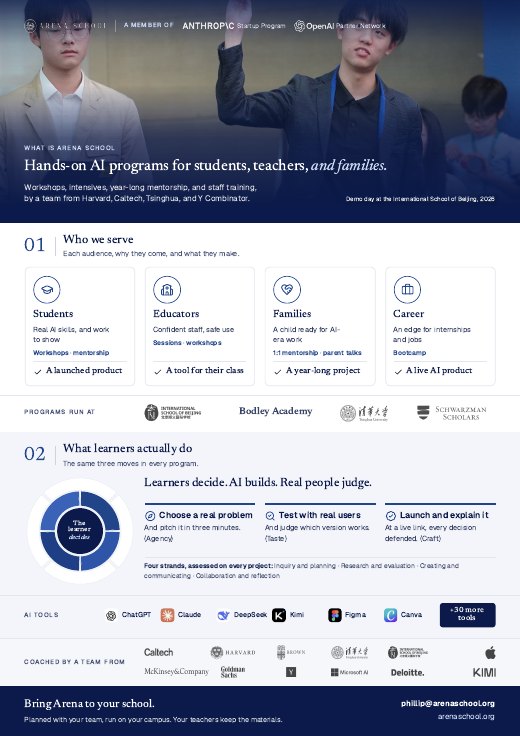
A one-pager for your board
Every program and what we have run.
We will email the one-pager to you within one working day.
Our team has your note and will reply personally within three working days.