



Make the small tool your class is missing.
Bring one task from grading, planning, or differentiation. Leave with a tool you made with AI, on your school’s approved tools, with your judgment in charge.
- WhoTeachers and curriculum leads
- SubjectsAny
- WhereAt your school
- CodingNone needed
Four pressures, four answers.
The questions we hear from teachers before every session, and how each session is built around them.
- The pressure
No time to learn one more thing
Planning, grading, and differentiation already fill the week.
How we answer itOne task, one tool, in the session
Each teacher brings a task from a class they teach now and leaves with a tool made with AI.
- The pressure
Unclear rules on tools and data
Which tools are allowed, and what student data may go into them, is often still being decided.
How we answer itYour approved tools, your data rules
We work only on the tools your school approves, and agree the data rules with your technology team first.
- The pressure
Polished work that hides the thinking
Students can hand in work AI helped produce, and the final product alone does not show who did the thinking.
How we answer itAssess the process
Drafts, reflections, and the reasons students give for each change, so the thinking is visible.
- The pressure
Training that does not reach Monday
A generic demo is hard to apply to the lesson you teach next week.
How we answer itStart from one part of one class
Teachers keep the tool and the prompt behind it, and each department gets a follow-up.
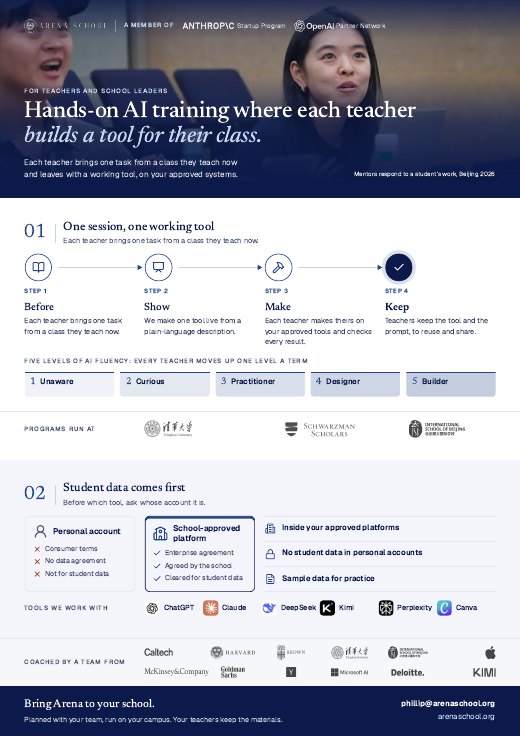
Before which tool, ask: whose account is it?
Our first job is safeguarding students. The same AI tool can be safe or unsafe for student data, depending on the account it runs in.
A personal account
Signed up by one person
- Terms
- Consumer terms, accepted by one user
- Data agreement
- None with the school
- Safeguards set by
- The provider
- Student data
- Not approved for student data
A school-approved platform
Set up and managed by the school
- Terms
- An enterprise agreement with the school
- Data agreement
- Yes, agreed by the school
- Safeguards set by
- The school
- Student data
- Approved, under the school’s policy
Inside your approved platforms
We work only in the accounts and tools your school approves, and agree the data rules with your team before any session.
No student data in personal accounts
Student names, work, and records never go into a personal or consumer account.
Sample data for practice
Teacher sessions use teachers’ own materials or anonymized sample data, not student records.
AI use disclosed
Learners say which steps they handed to AI, and how they used it.
Teachers learn to check the terms
Every teacher session covers whose account a tool runs in and what its data agreement says.
Your data-protection lead decides
We follow your data-protection officer and policy, and adjust when they do.
A few early adopters are there. We bring everyone else up.
Most schools have a few teachers already building with AI. We bring the rest of the staff up to par, safely, inside your school’s rules.
- Level 1UnawareHasn’t used AI, or avoids it.
- Level 2CuriousTries chat tools now and then.
- Level 3PractitionerUses approved tools weekly for planning, feedback, and admin.
- Level 4DesignerBuilds AI into lessons, and teaches students to use it responsibly.
- Level 5BuilderCreates tools for colleagues, and leads others.
- BaselineA short self-assessment places every teacher on the scale.
- One level upWe train each group up one level, starting where they are.
- Each termWe re-measure each term, so leadership sees the whole curve shift.
- In-house coachesLevel 5 teachers become coaches for their colleagues.
Small tools, made by teachers.
Each one started as a single task from a real class.
-
English · Literature
Poem annotator
Literary devices marked in a poem’s margin, ready for discussion.
Made by Ben, an English teacher at Shanghai American School (SAS)
-
Any subject
Who is missing what
Which students are missing which piece of knowledge, at a glance.
Made by Ben, an English teacher at Shanghai American School (SAS)
-
Any subject
Feedback helper
Comment ideas against your own rubric. You edit each one.
-
Your class
The tool you wish existed
Bring one task. We make the first version together.
Teachers are already using AI. The rules have not caught up.
Four findings from recent studies. Each links to its source.
- 5.9hours
a week saved, by their own estimate, among teachers who use AI at least weekly: about six weeks over a school year.
Source: Gallup and Walton Family Foundation, survey of 2,232 U.S. public K-12 teachers, spring 2025
- 31%
less lesson-planning time for teachers in an English trial who used ChatGPT with a guide. An expert panel found no difference in quality.
Source: Education Endowment Foundation trial, evaluated by NFER, reported March 2025
- 53%
of English, math, and science teachers said they used AI for school in 2025, up more than 15 points in one to two years.
Source: RAND, AI Use in Schools Is Quickly Increasing but Guidance Lags Behind, September 2025
- 34%
of teachers reported school or district policies on AI use related to academic integrity.
Source: RAND, AI Use in Schools Is Quickly Increasing but Guidance Lags Behind, September 2025
We start from what already works.
We don’t redesign your course. Each session starts from one small part of one class.
- 01 · Before
Which tool do you wish existed?
Each teacher brings one task from a class they teach now.
- 02 · Show
One tool, live
We make one tool on screen from a plain-language description.
- 03 · Make
Your own tool
Each teacher makes theirs on your approved tools and checks every result.
- 04 · Keep
Ready for class
Teachers keep the tool and the prompt behind it, to reuse and share.
Decisions about teaching and assessment stay with your faculty.
- 01 · A staff meeting
Live session
We show one task live, then teachers try it on their own material.
- 02 · A department
Hands-on workshop
Teachers work through several tasks on their own materials, with help in the room.
- 03 · The whole faculty
School-wide training
Each department gets a session, then a follow-up.
Assessment when students also have AI
We assess the process as well as the product: drafts, reflections, and the reasons students give for each change.
Built with teachers, on their own work.
- Tsinghua University · Staff training
Schwarzman College
Training for staff built around their own work, with their judgment in charge. The same format as AI for Educators.
- Who
- Staff, Schwarzman College
- Format
- Hands-on workshop
- Taught by
- Phillip An
- Shanghai American School · A teacher’s tools
Ben, English teacher
Two small tools for his own classes: a poem annotator that marks literary devices, and a view of which students are missing which piece of knowledge.
- Subject
- English
- Tools
- Poem annotator; Who is missing what
- Next · ACAMIS Technology Conference
Keystone Academy, Beijing
A 60-minute hands-on workshop for teachers and tech coaches, built on a case study from the International School of Beijing.
- When
- Sunday, October 18, 2026
- For
- Teachers and tech coaches
 ChatGPT
 Claude
 DeepSeek
 Kimi
Kimi Perplexity
 Canva
Canva
Or whatever your school has approved. The tool matters less than the habit of checking every result.
Common questions.
Is this more work for me?
It starts from one task you already do, and the tool is made during the session. You decide whether to keep using it.
I’m not technical. Will I keep up?
Yes. No technical background or coding is needed.
What about students using AI to cheat?
We address it directly: how to assess the process, through drafts, reflections, and the reasons behind each change, and when AI doesn’t belong.
Our school restricts tools and student data.
We work only on the tools your school approves, and agree the data rules with your technology team first. For technology staff →
Can I use my personal AI account with my class?
Not with student data. A personal account runs on consumer terms, with no data agreement with your school. We work in the accounts your school approves, and practice with sample data.
What do teachers keep afterward?
The tool they made and the prompt behind it, to reuse and share with colleagues.
Can it be for one department only?
Yes. A hands-on workshop for one department is one of the three formats; a school-wide training gives each department its own session and a follow-up.
Bring the training to your school.
Tell us about your faculty and preferred dates. We reply within three working days.
A one-pager for your principal
Every program and what we have run, on one page.
We will email the one-pager to you within one working day.
Our team has your note and will reply personally within three working days.